
Countdowns
 Countdowns
A countdown app built into your calendar
In Miracal you pin any event, task or birthday as a countdown – “Vacation in 1 week” then sits at the top of your calendar, and the Countdown widget shows it on your home screen. Free, and nothing extra to maintain.


Free download · iPhone & Android
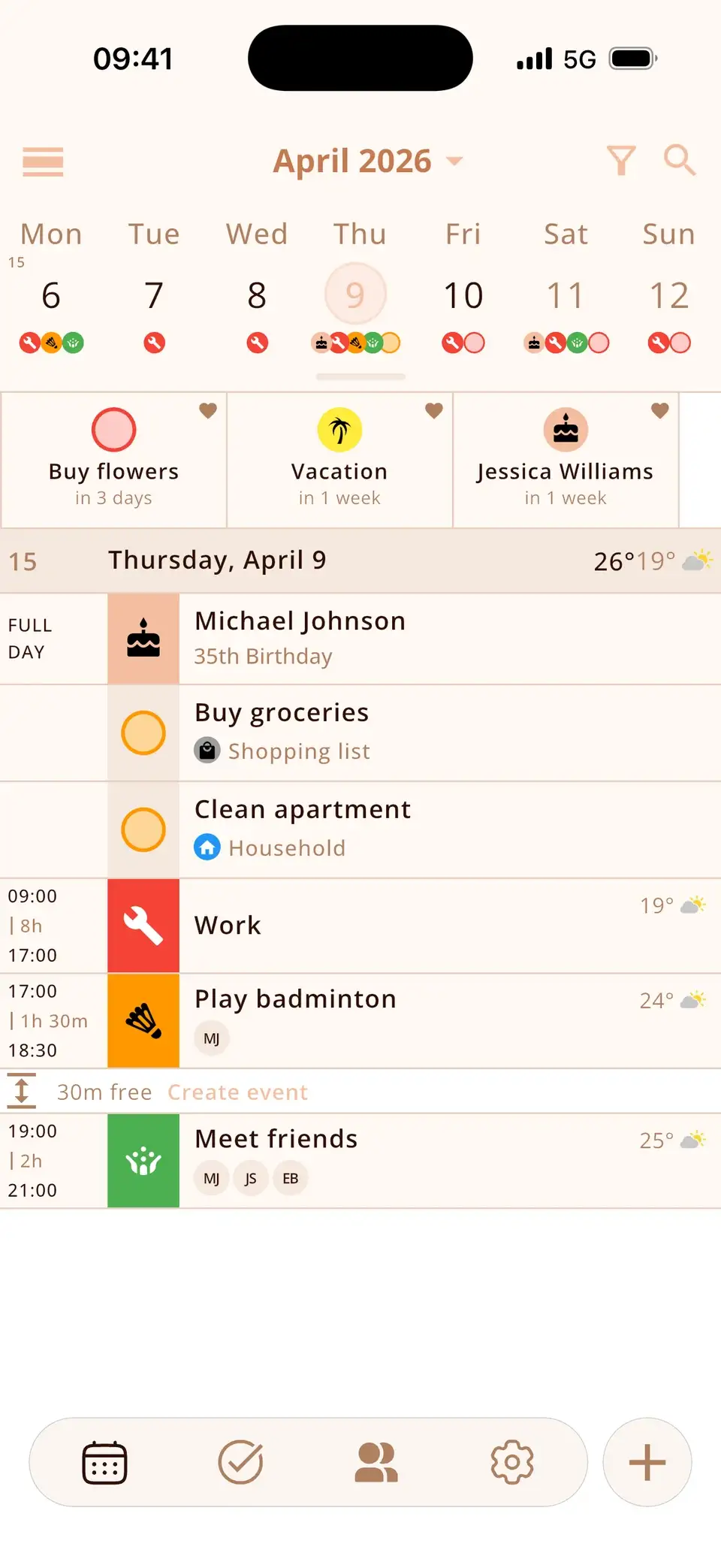
Pin what matters
Mark an entry as a favourite and it moves into the countdown row. Change the date and the countdown follows.
- Vacation and trips
- Exams and deadlines
- Weddings, concerts, moving day
- Birthdays
Your countdowns
- Exam in 2 days
- Taxes in 4 days
- Mum in 6 days
- Concert in 2 weeks
Your countdowns on the home screen
The Countdown widget shows what you've pinned, each with the time left – “in 3 days”, “in 1 week”. You see it every time you unlock your phone, without opening the app.
Small shows three countdowns, medium six and large up to twenty.


At a glance
What's coming up, at the top
Countdown cards above your calendar.
Countdowns
- Buy flowersin 3 days
- Vacationin 1 week
- Jessicain 1 week
Pin anything
Events, tasks and birthdays.

Cleans up after itself
Past events and completed tasks disappear automatically.
Free
Countdowns are part of the free version.
Ideas
- Vacation
- Exam
- Wedding
- Moving day
- Concert
- Birthday
- Deadline
No app?
Create a countdown right in your browser.
Good to know
- Past events and completed tasks leave the countdown row automatically.
Details & how-to
How do I create a countdown?
Open an event, task or birthday and pin it as a countdown. It appears as a card at the top of your calendar and shows how many days are left. You can pin several at once – the vacation, the exam and the next birthday.
What happens when the day has passed?
Countdowns clean up after themselves: past events and completed tasks leave the countdown row automatically.
Is it free?
Yes, countdowns are part of the free version. Without the app you can use the online countdown timer or the birthday countdown.
Ideas for countdowns
- Vacation, a trip or a festival
- Exams, a thesis deadline or the first day at a new job
- A wedding, a birth or moving day
- The birthday of someone close
- A task with a deadline – it disappears once you tick it off
Can I see the countdown on my home screen?
Yes. Add the Countdown widget (small, medium or large): it shows the events, tasks and birthdays you've pinned, each with the days left. On iPhone, touch and hold the home screen, tap “Edit” → “Add Widget” and search for Miracal.
Frequently asked questions
How do I create a countdown?
Open an event, task or birthday and tap the heart. It then appears as a countdown at the top of your calendar.
Is there a countdown widget?
Yes. Add Miracal's Countdown widget to your home screen – small, medium or large. It shows your pinned countdowns with the days left.
Are countdowns free?
Yes, countdowns and the Countdown widget are part of the free version.
Can I count down to any date online?
Yes – with our free countdown timer.
Keep what you're looking forward to in sight.
Free for iPhone and Android.
Free download · iPhone & Android