
Weather
 Weather
A calendar with the weather built in
Miracal shows the forecast right in your calendar: highs and lows for every day, an hourly forecast with chance of rain for 10 days, and the temperature for each event.


Free download · iPhone & Android
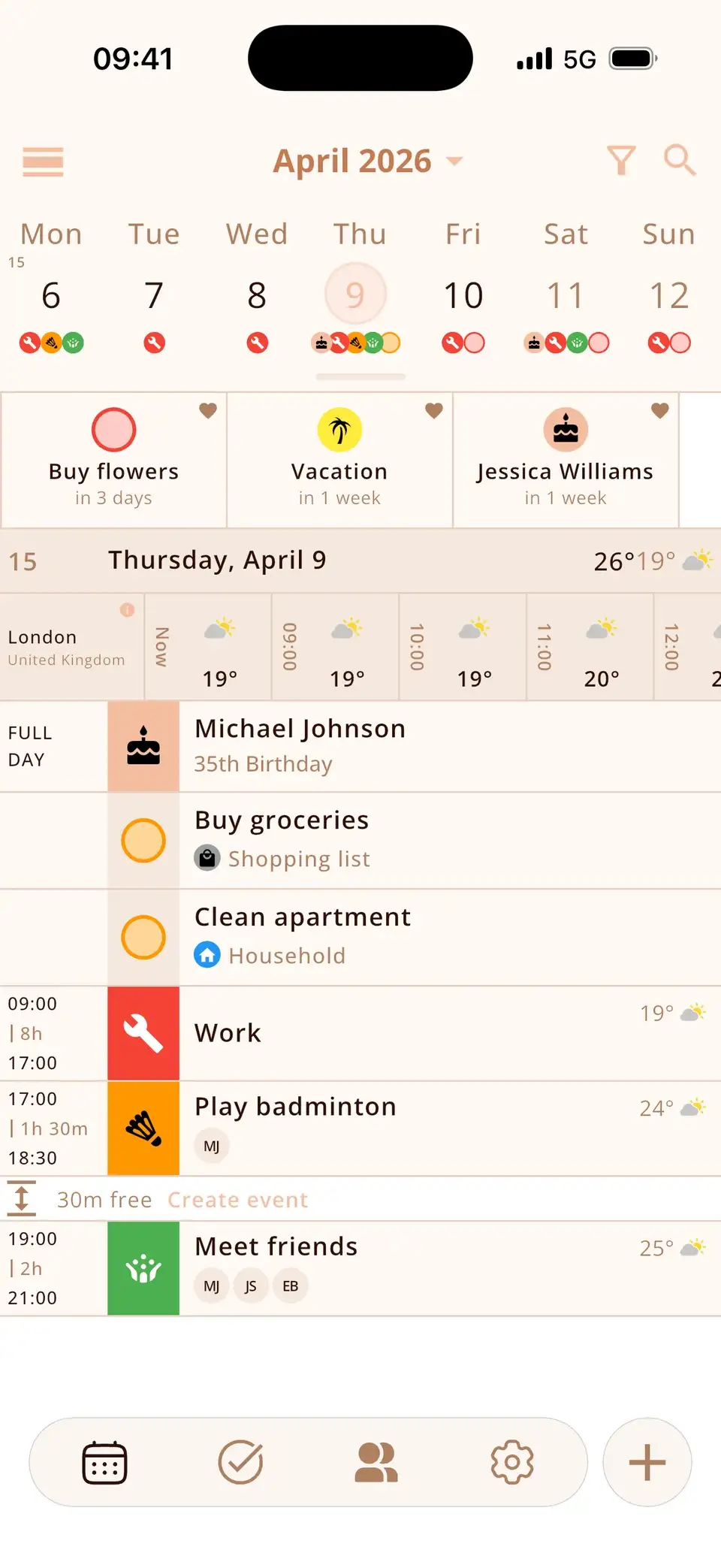
The forecast where you plan
The barbecue on Saturday shows 26° and sun, the bike ride on Tuesday the rain coming in.
- Daily high and low
- Hourly forecast with chance of rain, 10 days ahead
- Temperature next to each event
- Weather in widgets
Your location – or any place
Use your current location or a fixed place, in Celsius or Fahrenheit. Data from Apple Weather; your location isn't stored.
At a glance
The forecast where you plan
Highs and lows for every day, hourly with chance of rain.
Far ahead
hourly forecast
10days
Your unit
Celsius or Fahrenheit
°C/°F
Your place
Current location or a fixed place.
In widgets, too
The weather on your home screen.


Temperature for every event
Your location isn't stored
The forecast comes from Apple Weather; our server doesn't keep your location.
Good to know
- The weather forecast is part of Miracal PRO.
- Fetching the forecast needs an internet connection.
Details & how-to
What exactly does Miracal show?
- The high and low for every day.
- An hourly forecast with chance of rain, up to 10 days ahead.
- The expected temperature next to each event.
- The weather in the widgets on your home screen.
Units can be set to Celsius or Fahrenheit.
Which location is used?
Your current location or a fixed place you choose – handy if you plan for your home town while travelling. The forecast is fetched via Miracal's server from Apple Weather; your location isn't stored.
How do I turn it on?
The weather is part of Miracal PRO. After upgrading, enable it in the settings and allow location access, or enter a place. Fetching the forecast needs an internet connection.
When is weather in the calendar useful?
Whenever plans depend on it: a barbecue, a hike, the school run by bike, a wedding outdoors or a trip next week. Instead of switching to a weather app, you see the forecast right next to the event – and can move it to a drier day in the same place.
Is my location shared?
Only to fetch the forecast. Miracal has no account, and the server that requests the weather from Apple doesn't store your location. If you'd rather not share it at all, set a fixed place instead.
Frequently asked questions
Can I see the weather in my calendar?
Yes. With Miracal PRO, every day shows the forecast and events show the expected temperature.
Where does the weather data come from?
From Apple Weather (WeatherKit). Our server doesn't store your location.
Can I add weather to Google Calendar?
Google Calendar itself doesn't show weather. Miracal shows your Google calendars together with the forecast.
Plan your week with the weather in view.
Free download for iPhone and Android – weather with Miracal PRO.
Free download · iPhone & Android