
Widgets
 Widgets
Calendar widgets for home and lock screen
Five widgets put your day on the home screen: upcoming events, today & tomorrow, a countdown to what you're looking forward to, the next birthdays and quick add – plus your next events on the lock screen. Free; with PRO they show the weather, too.


Free download · iPhone & Android


Your day at a glance
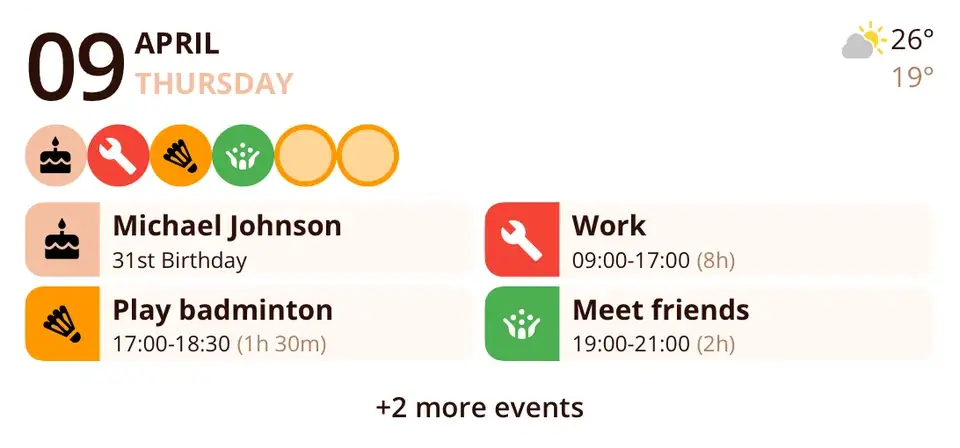
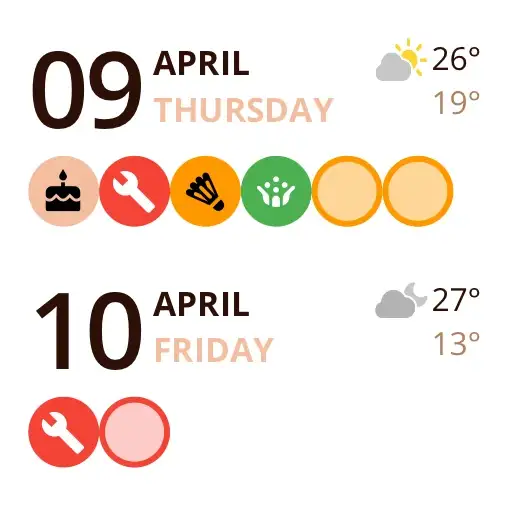
Upcoming Events shows today's date, a row of icons for everything that's on, and your next events, tasks and birthdays as cards. Today & Tomorrow puts both days side by side – handy for planning the evening or the next morning.
Both come in small, medium and large, show events from all your calendars and, with PRO, the day's high and low.


A countdown on your home screen
The Countdown widget shows what you're looking forward to: every event, task or birthday you've pinned as a countdown, with the time left – “in 3 days”, “in 1 week”. Pin something in the app and it appears in the widget.
Small shows three countdowns, medium six and large up to twenty.

Birthdays and quick add
Birthdays lists who's next – today, in 3 days, in 2 weeks – taken automatically from your contacts. Quick Add (small) creates a new event, task or contact with one tap.


Lock screen and Control Center
On the iPhone lock screen, Next events shows what's coming up – as a line above the clock or as a block below it. Round buttons create a new event, task or contact, and from iOS 18 the same actions are available as controls in Control Center.
On Android, Miracal's widgets are resizable and can be used on the lock screen, too.


At a glance
Your day on the home screen
Events, birthdays and weather – without opening the app.
Today & tomorrow
Widgets
for iPhone and Android
5
Lock screen
Next events and quick create.
Control Center
Controls from iOS 18.
The five widgets
- Upcoming Events
- Today & Tomorrow
- Countdown
- Birthdays
- Quick Add
With weather (PRO)
The forecast right in the widget.


Good to know
- Weather in widgets requires Miracal PRO.
- iOS and Android decide how often widgets refresh – opening Miracal updates them right away.
Details & how-to
Which widgets are there?
- Upcoming Events – what's next in your calendar.
- Today & Tomorrow – both days at a glance.
- Countdown – the events, tasks and birthdays you've pinned, with the days left.
- Birthdays – today, tomorrow or in X days.
- Quick Add (small) – new event, task or contact in one tap.
All except Quick Add come in small, medium and large. On Android the same five widgets are resizable.
Lock screen, Control Center and app icon
On the iPhone lock screen you can show your next events and buttons to create something new. With iOS 18, Miracal adds controls to the Control Center. A long press on the app icon offers shortcuts for a new event, task or contact.
How do I add a widget?
iPhone: long-press the home screen, tap “Edit” → “Add Widget” and search for Miracal. Android: long-press the home screen, choose “Widgets” and drag a Miracal widget into place.
Do widgets show the weather?
Yes, with Miracal PRO the widgets show the forecast as well. Everything else – events, birthdays and quick add – works in the free version.
Widget not updating?
iOS and Android decide how often widgets refresh. Opening Miracal once updates them right away. If a widget stays empty, check that Miracal has access to your calendars and contacts.
Frequently asked questions
How do I add a widget on iPhone?
Touch and hold the home screen, tap “Edit” → “Add Widget” and search for Miracal.
How do I add a widget on Android?
Touch and hold the home screen, tap “Widgets” and drag Miracal's widget onto it.
Is there a countdown widget?
Yes. The Countdown widget shows the events, tasks and birthdays you've pinned as countdowns, each with the days left – in small, medium or large.
Are the widgets free?
Yes – only the weather inside them requires PRO.
Can the widget show Google Calendar and Outlook?
Yes. Add the accounts on your phone (iPhone: Settings → Apps → Calendar → Calendar Accounts) and Miracal's widgets show their events next to iCloud. The free version syncs one calendar, PRO all of them. Step-by-step guide
Your day on your home screen.
Free for iPhone and Android.
Free download · iPhone & Android